This document was originally written in 2005 by Gary Kramlich and John Bailey as Docbook. It has been copied here to make it easier to access.
Stock Ticker
Anyone that has used the official Windows AIM client has without a doubt, ran into the built in stock ticker. While researching for a suitable quote feed for a similar plugin in Pidgin I decided to take a look into how WinAIM did it. This document details my findings on the way WinAIM handles stock quote requests.
The Quote Server
According to my initial research, the quote server resides at
quotewebvip-m01.blue.aol.com. All of the requests are done over HTTP using
the GET method.
- Since at least WinAIM 5.9 the URL for this is
http://aim-charts.pf.aol.com. - MacAIM 4.7 PowerPC has been seen using
http://charts.netscape.com.
The request URL is in the format of
http://quotewebvip-m01.blue.aol.com/?action=aim&syms=. The action
parameter is required, and must be set to aim. Without it, the server will
not return any results. The syms is used to specify the symbols you want to
lookup. You can specify multiple values by separating them with a comma. There
is also an optional fields parameter that can be used to specify the
information that you are requesting.
The server will respond with lines of key=value. Let's look at the results
for Google (GOOG) with a request of /?action=aim&syms=goog, the server
responds with the
following:
Title=MyStock
Section=MyPortfolio
DATA=GOOG;417.7000;3.60990
As you can see, we are not concerned with the Title and Section lines. The
data line is what we are really after. The format of the data line is the
same as the field parameter delimited by ;'s. But as you'll notice, we
didn't specify a field parameter. If no field parameter is specified, the
server uses a value of npg as the default fields to request which is
discussed in the next section.
Field Tokens
The quote server has a fields parameter where you can specify what fields you
want returned. If you do not use the fields parameter it will return the symbol
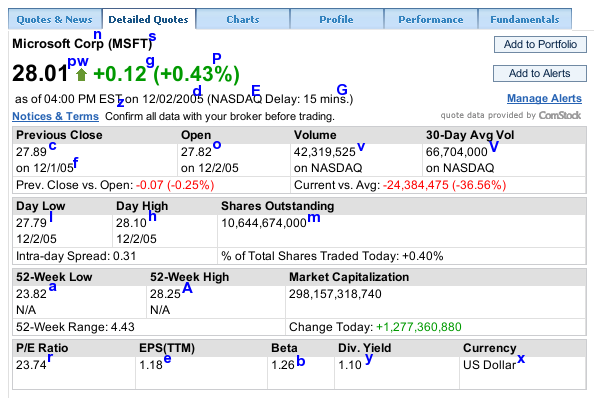
name (n), the current price (p), and the change (g). Below is a
screenshot from AOL Finance overlaid with their corresponding tokens.
Microsoft was chosen because it was the first one I found which had a value for each field. Note that not every field is shown since not all of them are on this page and unknown items were omitted.
| Token | Description |
|---|---|
| a | 52-Week lower range |
| A | 52-Week upper range |
| b | Beta (volatility) |
| c | Previous Close Value |
| d | Date of the quote |
| e | Earnings Per Share |
| E | Exchange |
| f | Previous close date |
| F | Quote Provider |
| g | Change |
| G | Delay |
| h | Day high |
| i | Day high time |
| j | Day low time |
| l | Day Low |
| m | Outstanding Shares |
| n | Company Name |
| o | Opening |
| p | Current Price (Can not be used with w) |
| P | Percent Change |
| r | P/E Ratio |
| s | Symbol |
| t | Last close date? |
| v | Volumes |
| V | 30 day average volume |
| w | Current Price (Can not be used with p) |
| x | Currency |
| y | Div Yield |
| z | Close date and time |